
Apa itu DHCP Server?
DHCP (Dynamic Host Configuration Protocol) Server berfungsi untuk MEMINJAMKAN IP Address secara otomatis ke client, jadi client nggak perlu repot-repot setting IP manual supaya bisa satu jaringan dengan server.
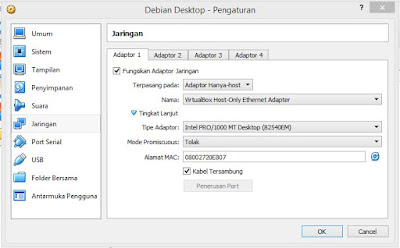
1. Atur Jaringan Debian di VirtualBox
- Masuk ke Settings → Network di VirtualBox.
- Pilih mode jaringan yang sesuai (misalnya: Bridged Adapter atau Internal Network).
- Klik OK.
- Jalankan Debian, lalu login.
2. Backup dan Edit Konfigurasi Network
Backup dulu file konfigurasi lama:
cp /etc/network/interfaces /etc/network/interfaces.oldEdit file konfigurasi:
nano /etc/network/interfacesContoh konfigurasi:
auto lo
iface lo inet loopback

auto eth0
iface eth0 inet static
   address 200.6.1.1
   netmask 255.255.255.0
   network 200.6.1.1
   broadcast 200.6.1.255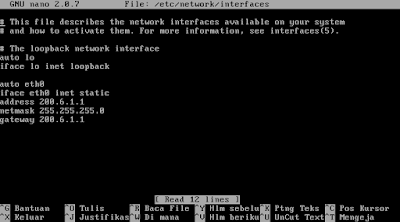
Simpan (Ctrl+X → Y → Enter).
Restart network:
/etc/init.d/networking restart
Cek IP:
ifconfig -a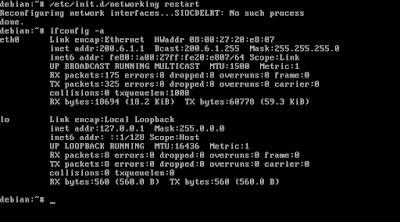
3. Install DHCP Server
apt-get install dhcp3-server
4. Konfigurasi DHCP
Masuk ke folder konfigurasi DHCP:
cd /etc/dhcp3/
cp dhcpd.conf dhcpd.conf.old
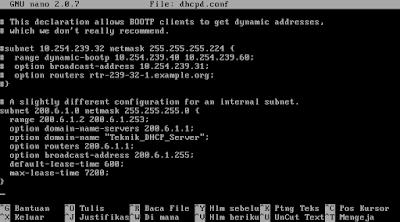
nano dhcpd.conf
Contoh konfigurasi dhcpd.conf:
subnet 200.6.1.0 netmask 255.255.255.0 {
   range 200.6.1.2 200.6.1.50;
   option routers 200.6.1.1;
   option domain-name-servers 200.6.1.1;
   option domain-name "Teknik_DHCP_Server";
   option subnet-mask 255.255.255.0;
   option broadcast-address 200.6.1.255;
   default-lease-time 600;
   max-lease-time 7200;
}
Simpan lalu restart DHCP:
/etc/init.d/dhcp3-server restart5. Testing DHCP
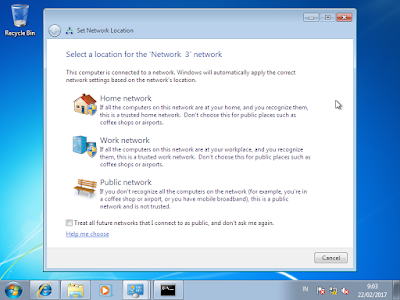
- Jalankan Windows XP/7 di VirtualBox.
- Atur jaringannya sama dengan Debian (Internal Network).
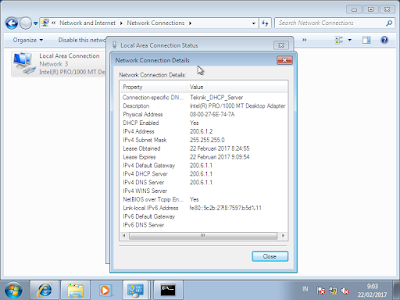
- Atur client Windows ke Obtain IP automatically.
- Cek apakah client sudah dapat IP otomatis dari server Debian.
6. Selesai
Kalau masih error:
- Pastikan konfigurasi subnet, range, DNS, dan broadcast sudah benar.
- Restart DHCP service.
Sekian tutorial kali ini.
Selamat mencoba dan tetap semangat kalau gagal di awal.



Leave a Reply